We use cookies to give you the best possible experience on our website. By continuing to browse this site, you give consent for cookies to be used. For more details, please read our Online Terms & Conditions, Privacy Policy, Cookies Policy and Personal Information Collection Statement.
We recommend using a computer web browser or Hang Seng Mobile App to log on for enhanced security. Please visit "Security Information Centre" for more security tips.



To meet the latest overseas and cross-border transfer requirements, from 29 Sep 2026, you must include "Town / city" in both payee's and your residential address details to make transfers. If you address hasn't added "Town / city", please update via "Settings & Security" > "Account & personal particulars" > "Update personal particulars" > "Residential Address" as soon as possible, or you won't be able to make transfers.
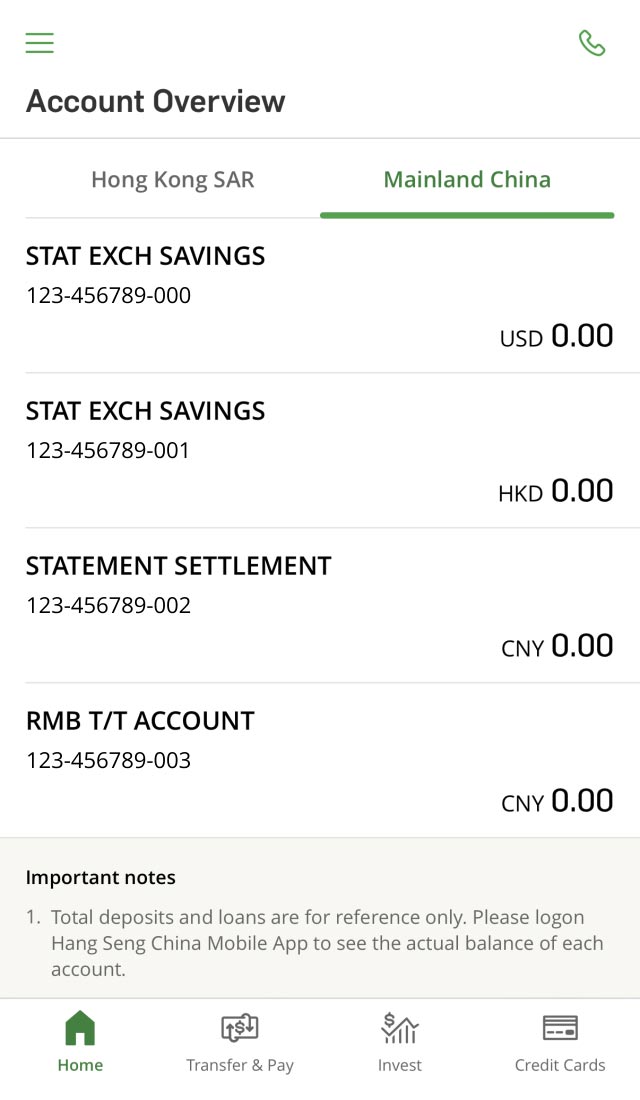
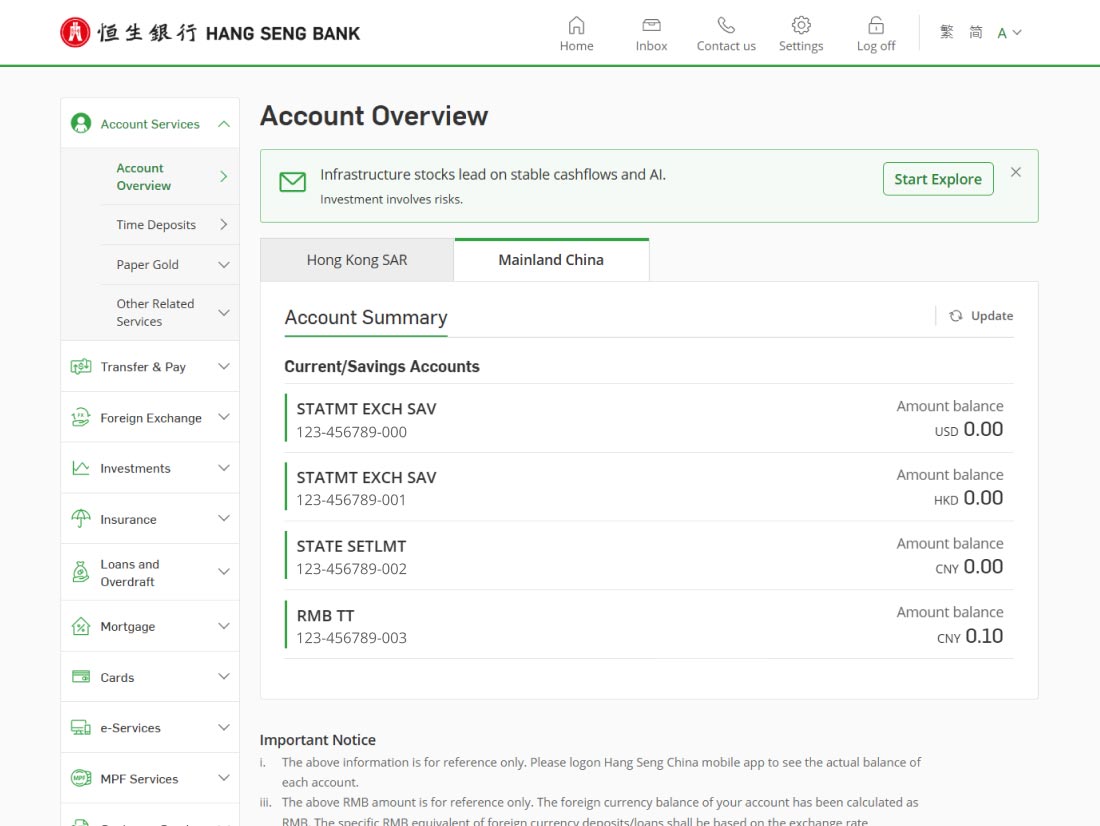
Simply log on to Hang Seng Mobile App, Personal e-Banking or Hang Seng China Mobile Banking App, you can check your self-named Hang Seng HK and Hang Seng China accounts[3] on the same page.
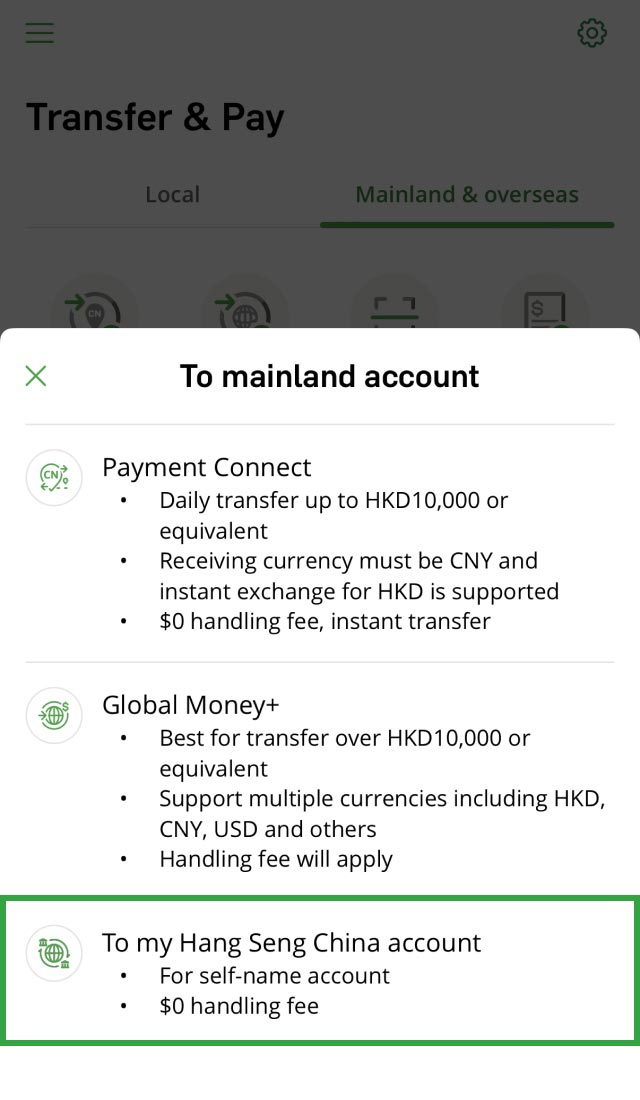
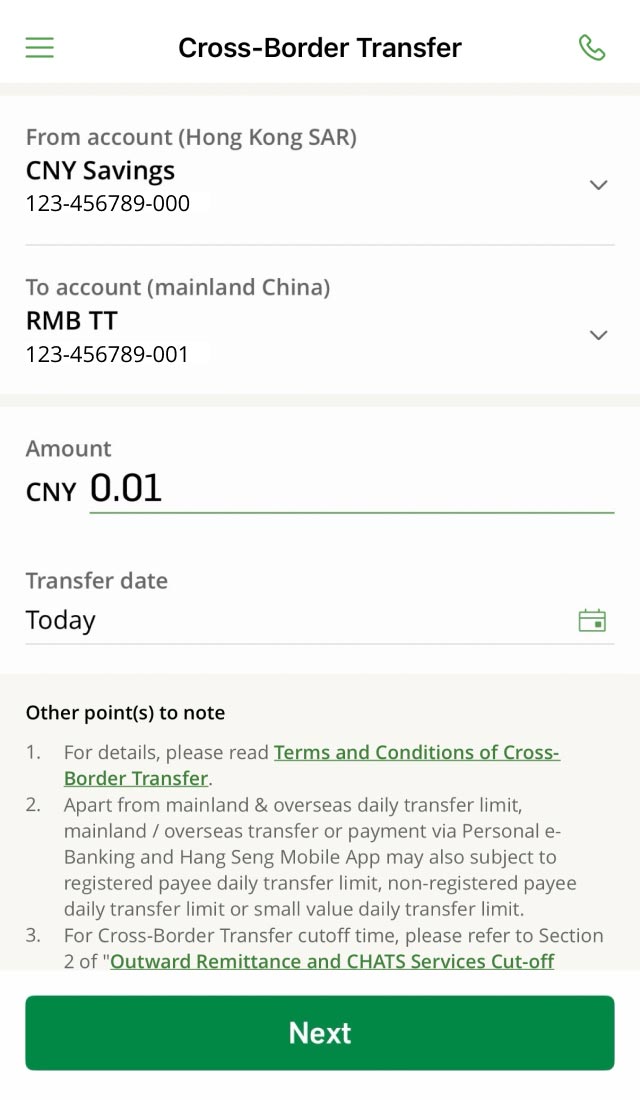
You can easily transfer funds between your self-named Hang Seng HK and Hang Seng China accounts with 0 handling fees via Cross-Border Transfer service on Hang Seng Mobile App, Personal e-Banking or Hang Seng China Mobile Banking App.
Cross-Border Transfer supports 10 currencies: RMB, HKD, USD, EUR, GBP, AUD, NZD, CAD, CHF and JPY.


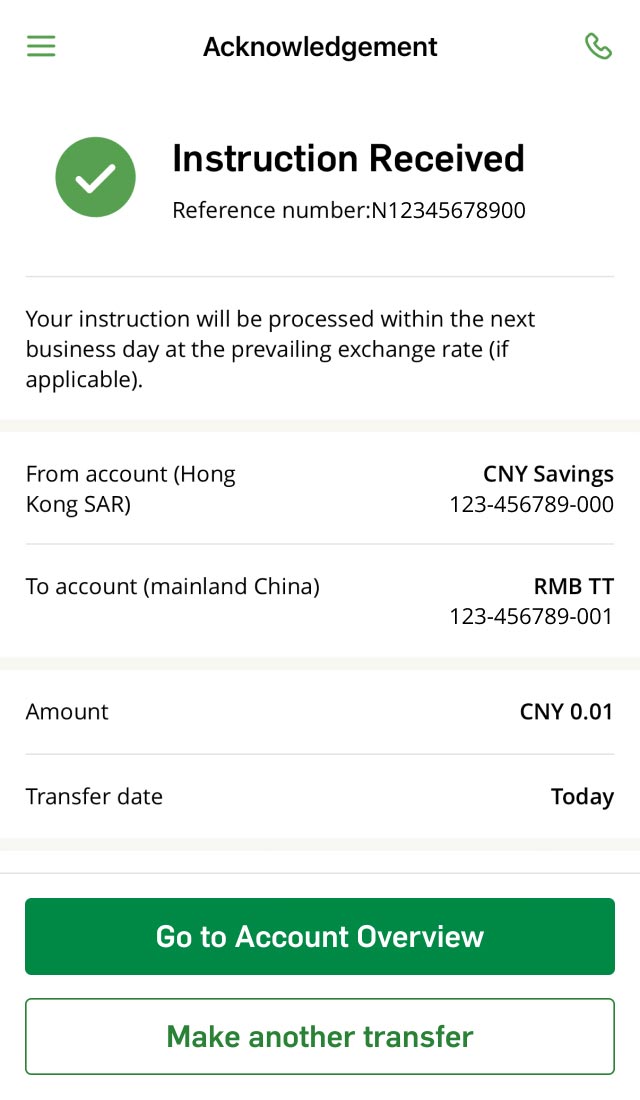
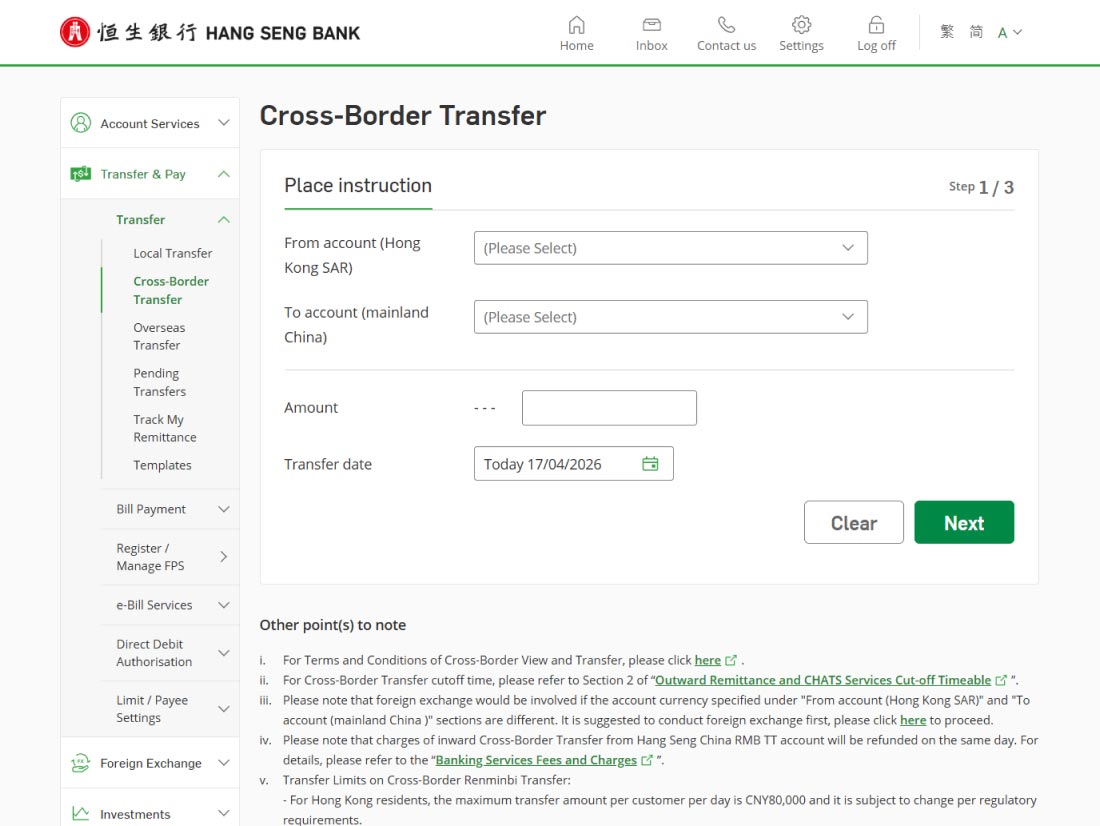
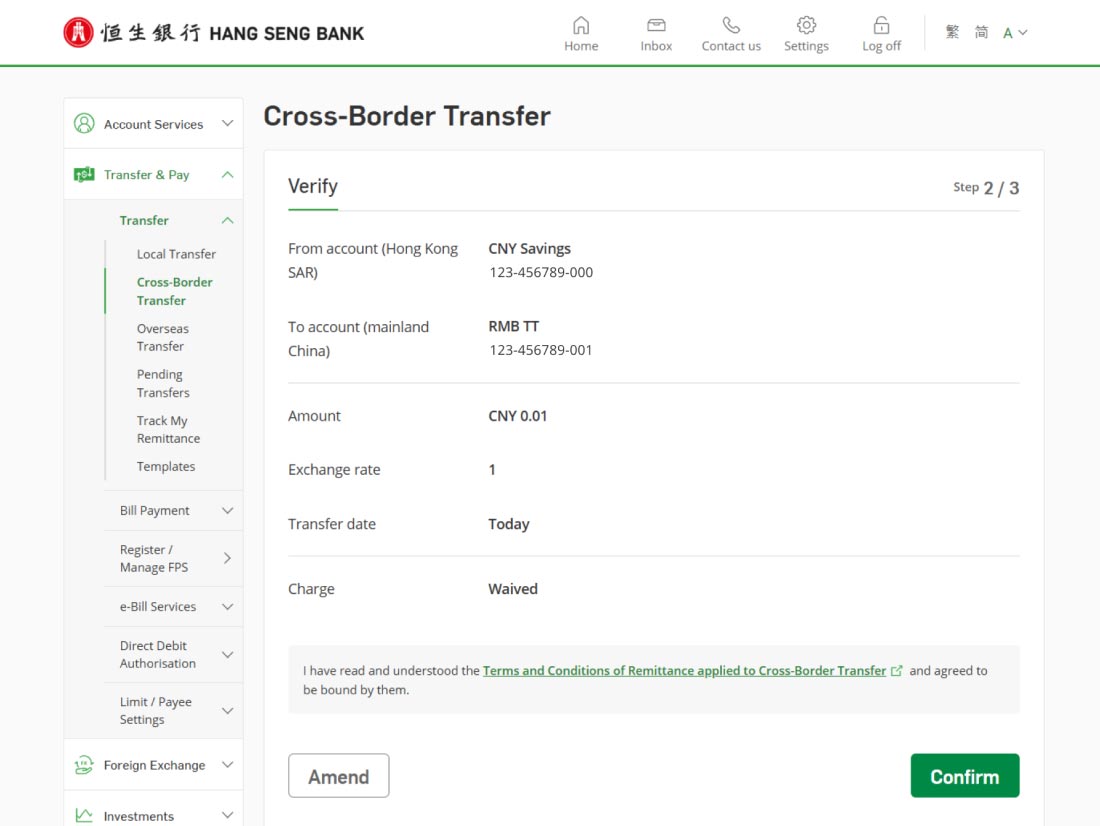
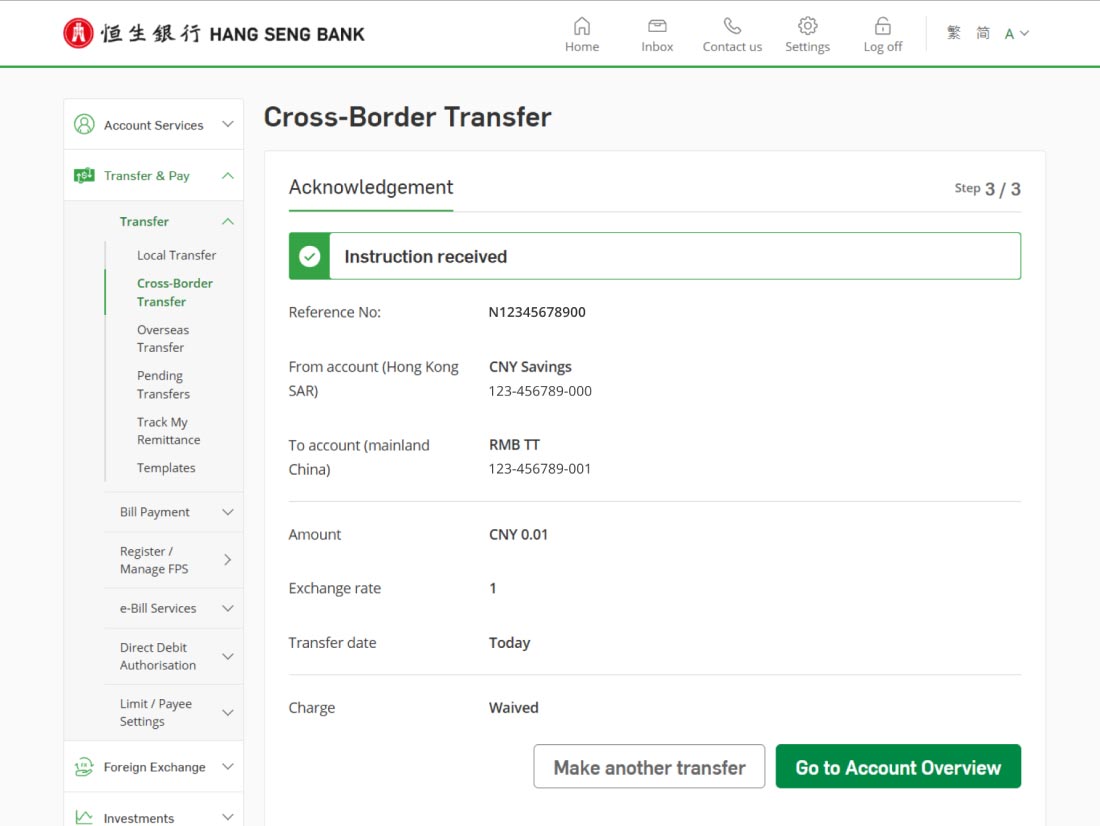



Download Hang Seng Mobile App via APK file
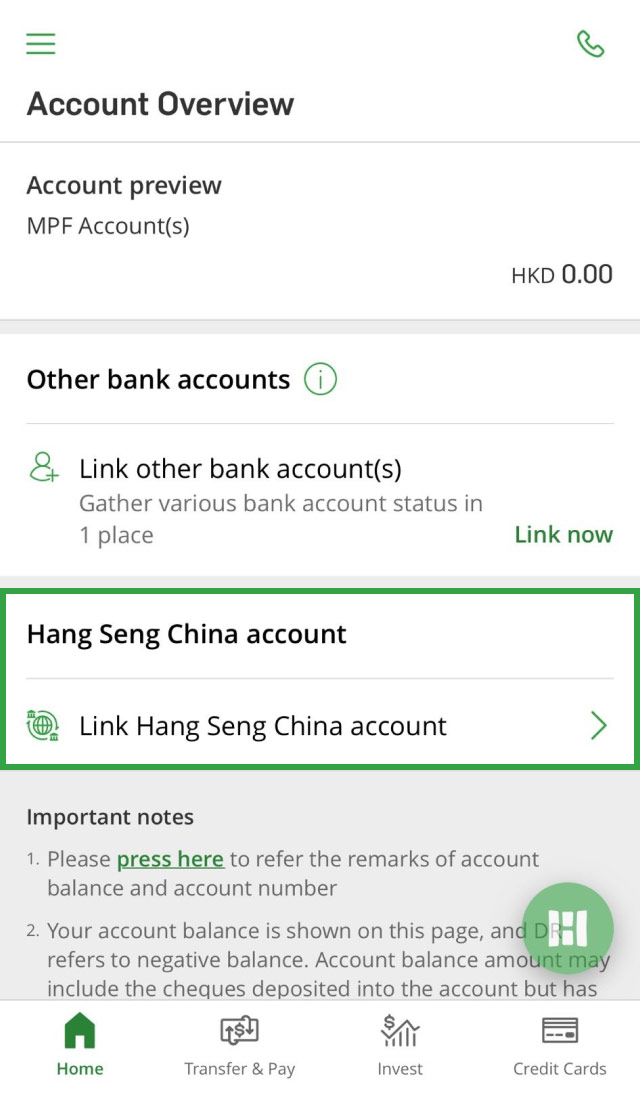
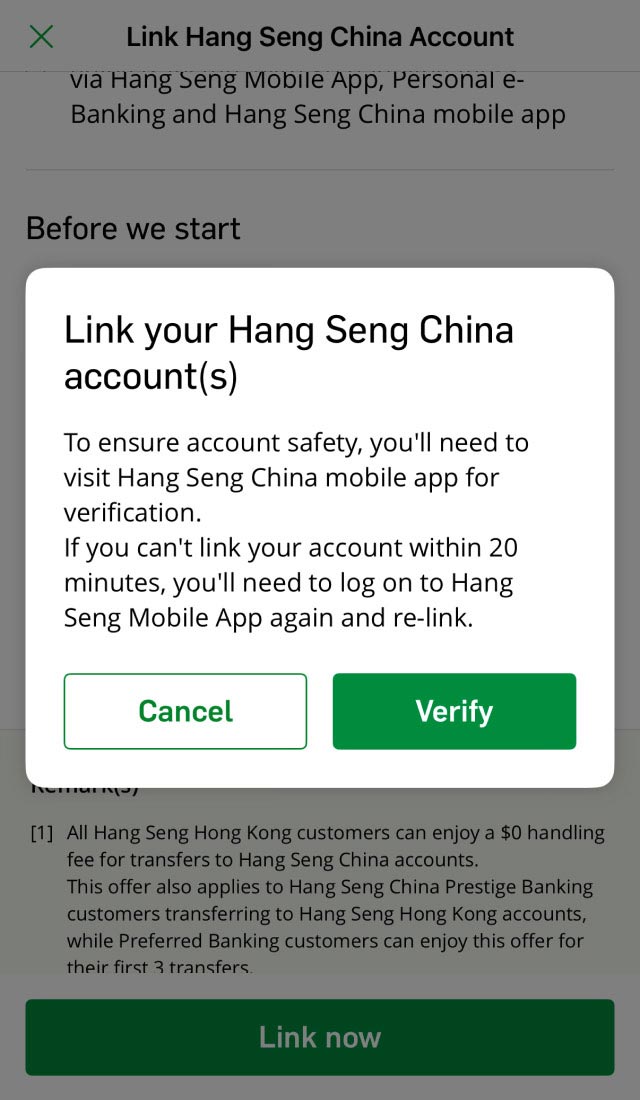
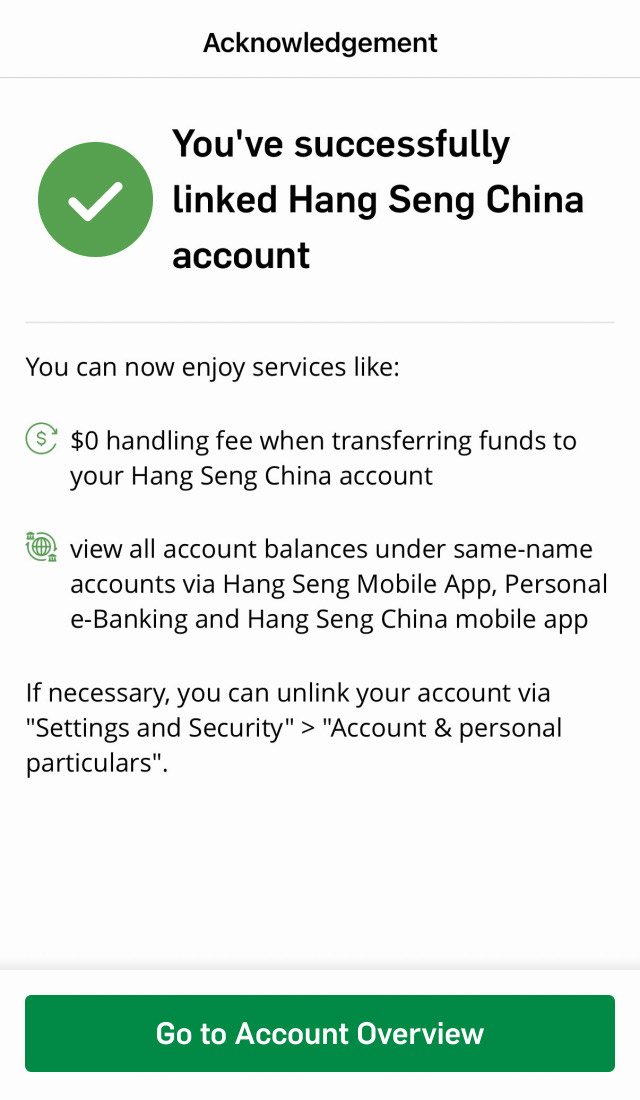
You can register for "Cross-Border View and Transfer" service via Hang Seng Mobile App. After successful registration, you can check your account and submit transfer instructions between your self-named Hang Seng HK and China accounts anytime, anywhere with ease.
Cross-Border View
With 1 convenient logon, you can check the balances of both your self-named Hang Seng HK and Hang Seng China accounts via Hang Seng Mobile App, Personal e-Banking and Hang Seng China Mobile Banking App.
Cross-Border Transfer
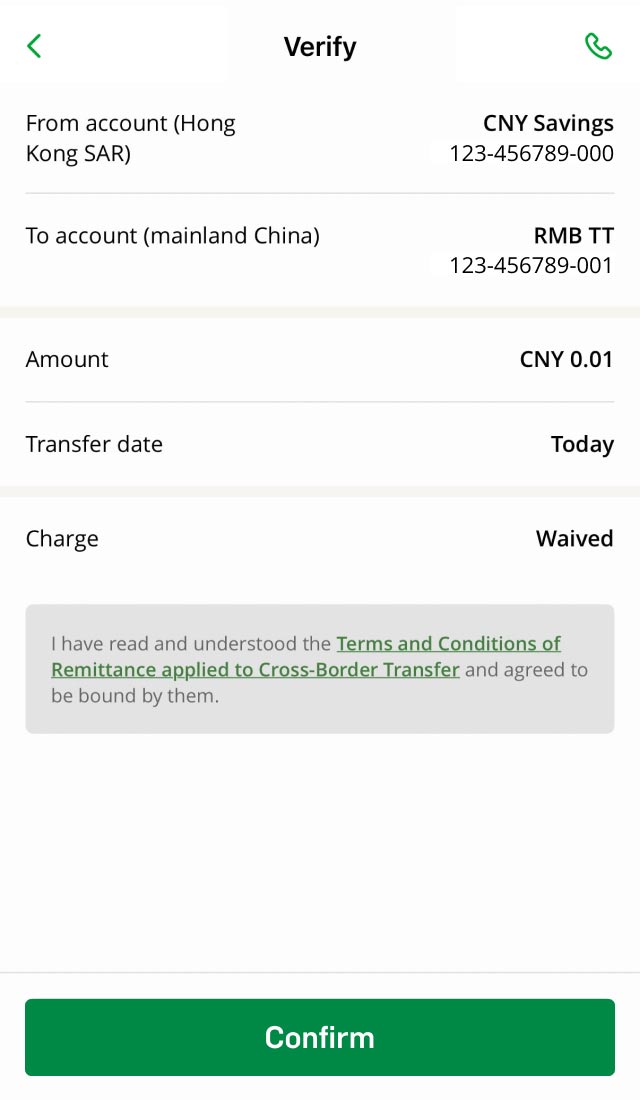
You can easily transfer funds between your self-named Hang Seng HK and Hang Seng China accounts via Hang Seng Mobile App, Personal e-Banking and Hang Seng China Mobile Banking App, with all fees waived.
Note: The fee waiver is only applicable to transfer instructions submitted via the Cross-Border Transfer section. Any fund transfer instructions across Hang Seng HK and Hang Seng China submitted via other channels are subject to outward or inward remittance fees and charges as stipulated in the "Banking Services Fees and Charges".
To register for the service, you must:
Please note that Hang Seng HK joint-named accounts can't be shown on the Cross-Border View page in Hang Seng China Personal Banking Mobile App.
Registration / cancellation is only available via Hang Seng Mobile App.
No. You're required to manually register for "Cross-Border View and Transfer" service via Hang Seng Mobile App to link the accounts. You can refer to "How it works?" > "Register for Cross-Border View and Transfer" tab in this page for details.
Cross-Border Transfer lets you transfer up to 10 currencies to your self-named Hang Seng China account with no handling fees. Please note that only RMB TT account is applicable to RMB Cross-Border Transfer in Hang Seng China.
Payment Connect allows you to transfer RMB to designated mainland banks with $0 fee almost instantly (up to HKD10,000 or equivalent and subject to your daily small value transfer limit). For more details, please visit the Hang Seng Payment Connect Website.
If your transfer doesn't match any of the above criteria, you can proceed with Global Money+. Please note remittance charge may apply and the arrival time may be longer. For more details, please visit the Hang Seng Overseas Transfer Website.
Please note: to meet the latest overseas and cross-border transfer requirements, you must include "Town / city" in both payee's and your residential address details to make Cross-Border or Global Money+ transfers.
The service will be effective instantly after successful registration.
Please note that your accounts will be unlinked if your personal details don't match between Hang Seng HK and Hang Seng China. We'll notify you via SMS or letter for a follow-up.
Cross-Border View and Transfer is a fee-free function.
Please note, any charges incurred from inward fund transfer from Hang Seng China RMB TT Accounts will be imposed and refunded on the same day.
In general, after you've submitted a Cross-Border Transfer instruction via Personal e-Banking, the funds are debited instantly and therefore can't be amended or cancelled.
If you still need to amend or cancel a completed Cross-Border Transfer instruction, please visit any of our local branches or contact us. A fee of HKD220 will be charged on behalf of the Clearing Bank and is subject to change by the Clearing Bank without advance notice.
To avoid any fee being incurred, please consider placing a new Cross-Border Transfer instruction from Hang Seng China back to your Hang Seng Hong Kong account to offset the previously completed transfer.
No. You can only select Hang Seng HK account as the debit account when transferring funds from HK to mainland with Cross-Border Transfer.
If you'd like to debit funds from a Hang Seng China account, please update the settings via Hang Seng China Personal e-Banking or Mobile Banking App.
If you submit a Cross-Border Transfer instruction from Hang Seng HK before the same-day value cut-off time from Mon to Fri (must be working day for both Hong Kong and mainland), the fund will be credited to your Hang Seng China account on the same day.
For instructions submitted after the same-day value cut-off time, or on Sat, Sun or public holidays, the funds will be credited the next working day of HK and mainland.
For details of the same-day value cut-off time, please refer to "Outward Remittance" section under Outward Remittance & CHATS Services Same-day Value Cut-off Times (for reference only).
The forward-dated transfer is only available for transfer instructions from Hang Seng Hong Kong to Hang Seng China. You can set up to 45 days in advance.
The maximum online daily transfer limits are:
These limits are shared respectively by Cross-Border Transfer, fund transfers to third-party Hang Seng HK accounts, remittances and fund transfers to other local bank accounts through FPS or CHATS.
You can register your Hang Seng China account by logging on to Personal e-Banking > "Settings" > "Transfer and payment" > "Payee Maintenance", or when submitting a Cross-Border Transfer instruction.
Please note, instruction will be effective on next working day if you submit before the cut-off time of 9:00 p.m. (Mon to Fri) or 6:00 p.m. (Sat), or in 2 working days if you submit after the cut-off time of 9:00 p.m. (Mon to Fri) or 6:00 p.m. (Sat) or on public holidays.
The maximum mainland & overseas daily transfer limit is HKD1,500,000 and only applies to transfer payee outside Hong Kong. The transfer amount may also subject to registered / non-registered payee daily transfer limit or small value daily transfer limit, whichever is lower.
Based on RMB transfer regulations, Hong Kong residents (or HKID card holders) are subject to a daily transfer limit of RMB 80,000 to self-named account in mainland China. Transfers to mainland China or overseas for non-Hong Kong residents (or non-HKID holders) are subject to the regulations of the respective regions. Overseas transfers may be rejected due to the regulations and are subject to a handling fee.
You can transfer RMB via Cross-Border Transfer from Hang Seng HK account to your self-named Hang Seng China account.
Based on RMB transfer regulations, Hong Kong residents (or HKID card holders) are subject to a daily transfer limit of RMB80,000, covering your RMB transfer via Cross-Border Transfer, remittance to your self-named account in mainland China and RMB self-named transfer through other financial institutions. Transfers to mainland China or overseas for non-Hong Kong residents (or non-HKID holders) are subject to the regulations of the respective regions. Overseas transfers may be rejected due to the regulations and are subject to a handling fee.
Besides, as the payee is outside Hong Kong, this service is also subject to your mainland & overseas daily transfer limit.
To register for "Cross-border View and Transfer" service, you must also hold an eligible Hang Seng HK account and activate Personal e-Banking for both locations. Eligible Hang Seng HK accounts include self-named Prestige Private, Prestige Banking, Preferred Banking and Integrated Account.
You can refer to "How it works?" > "Register for Cross-Border View and Transfer" tab in this page for details.
The final debit amount and exchange rate will be calculated based on the exchange rate when your transfer is executed. Once it's complete, you'll receive a notification by SMS, email and/or push notification (if enabled) with the final exchange rate.
Send money overseas in just a few steps using Hang Seng Mobile App, even you're on the go! Enjoy $0 handling fee for transfers to designated countries and regions.
Make instant small value RMB transfers to designated mainland bank accounts with $0 handling fee effortlessly!
Enjoy easy Cross-Border Wealth Management with flexibility anytime and anywhere at your convenience.
Secure your online transfers by setting your transfer and payment limits in a few steps.
(852) 2822 8282 (Hong Kong)
4001 20 8282 (mainland China[4])